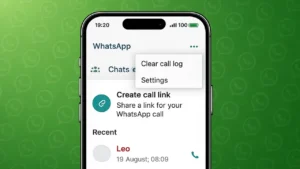
WhatsApp calls are convenient, but over time the call log can become crowded with old, missed, or unwanted entries. If you share your phone with someone or simply want a cleaner Calls tab, removing call history is a useful option.
This guide explains how to clear WhatsApp call history on Android and iPhone using only official, built-in settings.
Also read: How to Disconnect Synced Contacts From Instagram
Understanding WhatsApp Call Logs
WhatsApp automatically saves a record of:
- Voice calls
- Video calls
- Missed calls
These entries appear in the Calls section of the app. Call logs are stored locally on your phone and can be deleted without affecting chats or contacts.
How to Delete Individual WhatsApp Call Entries
On Android
- Open WhatsApp
- Tap the Calls tab
- Press and hold the call you want to remove
- Tap the delete option
- Confirm the action
Only the selected call entry will be deleted.
On iPhone
- Open WhatsApp
- Go to Calls
- Swipe left on the call entry
- Tap Delete
This removes a single call from the list.
Also read: How Message Reactions Work in Telegram and How to Use Them
How to Clear All WhatsApp Call History at Once
On Android
- Open WhatsApp
- Go to the Calls tab
- Tap the three-dot menu
- Select Clear call log
- Confirm to remove all call records
On iPhone
- Open WhatsApp
- Tap Calls
- Select Edit at the top
- Tap Clear
- Confirm your choice
This deletes the entire WhatsApp call history in one step.
What Gets Deleted and What Stays
When you clear WhatsApp call history:
- Call logs are removed
- Chats remain unchanged
- Media files stay safe
- Contacts are not affected
Only the call records are deleted.
Also read: How to Find Mutual Friends on Snapchat Easily
Can Call History Come Back After Deletion
If you restore WhatsApp from an old backup that includes call logs, the history may return. To avoid this:
- Create a new backup after clearing the call history
- Or restore only when necessary
Why Clearing WhatsApp Call History Is Useful
People often clear call logs to:
- Maintain privacy
- Remove unnecessary records
- Keep the app organized
- Prepare the phone for resale or sharing
It is a simple habit that helps keep your WhatsApp usage tidy.
Also read: How to Edit Videos Directly in WhatsApp on Android and iPhone
Final Thoughts
Clearing WhatsApp call history on Android and iPhone is quick, safe, and does not affect your chats or data. WhatsApp provides easy options to delete single call entries or wipe the entire call log. If privacy and organization matter to you, checking your call history from time to time is a good practice.