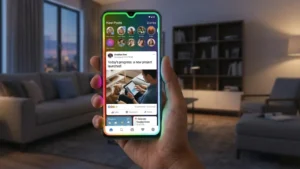
If you enjoy customizing your Android phone, changing the wallpaper is only the beginning. Many users also want their device to stand out whenever they receive a notification, incoming call, or charging alert. That’s where Edge Lighting – LED Wallpaper comes in.
This Android customization app adds colorful LED border lighting around your phone’s screen, making notifications and alerts more noticeable while giving your device a stylish, modern appearance. Along with customizable edge lighting effects, the app also offers live wallpapers and several personalization options to match your preferences.
In this guide, we’ll explore its key features, customization options, setup process, advantages, limitations, and who should consider using it.
Also read: Give Your Android a Fresh Look With Live Launcher Lite and Stunning 3D Wallpapers
What Is Edge Lighting – LED Wallpaper?
Edge Lighting – LED Wallpaper is an Android personalization app that displays animated LED light effects around the edges of your screen. Whenever you receive a call, message, notification, or connect your phone to charging, colorful border animations appear around the display.
The app is designed to improve both the appearance and visibility of notifications while allowing users to personalize their phones with various lighting styles and live wallpapers.
Key Features of Edge Lighting – LED Wallpaper
Colorful LED Notification Effects
One of the biggest highlights of the app is its animated LED border lighting. Instead of relying only on standard notification sounds or vibration, your phone displays vibrant lighting around the screen whenever selected notifications arrive.
You can enable lighting for:
- SMS messages
- Social media notifications
- Messaging apps
- Incoming calls
- Charging notifications
- Other supported applications
This makes it easier to notice alerts, especially when your phone is lying face up.
Customizable Border Lighting
The app allows users to personalize nearly every aspect of the lighting animation.
Available customization options include:
- Border thickness
- Animation speed
- Lighting colors
- Corner radius
- Edge styles
- Multiple lighting effects
You can create a minimal look or choose colorful RGB-style effects depending on your preference.
Live Wallpapers
Besides edge lighting, the app also includes animated live wallpapers that work alongside the LED effects.
These wallpapers help give your home screen and lock screen a more dynamic appearance without requiring additional customization apps.
Charging Animation
The LED border can also appear automatically when your phone is connected to a charger.
Instead of only seeing the charging icon, you’ll get attractive lighting effects around the display, making charging notifications more visually appealing.
Incoming Call Lighting
You can enable separate lighting effects for incoming calls.
This feature can make calls easier to notice, especially if your phone is on silent mode or vibration.
Notification Privacy Options
The app also includes options that allow users to hide notification content while still displaying colorful edge lighting.
This lets you know a notification has arrived without showing its details on the screen.
Personalization Options
Edge Lighting offers several ways to customize the appearance of your phone.
You can adjust:
- LED border colors
- Animation effects
- Speed of movement
- Border width
- Screen corner style
- Notch compatibility
- Punch-hole display support
- Infinity display support
- Live wallpaper selection
These options make it easy to match the lighting with your phone’s overall theme.
How to Set Up Edge Lighting on Android
Getting started is simple.
Step 1
Install Edge Lighting – LED Wallpaper from the Google Play Store.
Step 2
Open the app and grant the required permissions.
The app may request:
- Display over other apps
- Notification access
- Accessibility permissions (if required)
These permissions are necessary for the lighting effects to work properly.
Step 3
Choose which notifications should trigger LED lighting.
You can enable effects for:
- SMS
- Calls
- Social apps
- Messaging apps
- Charging events
Step 4
Customize the lighting style.
Adjust:
- Colors
- Border size
- Animation speed
- Corner radius
- Lighting duration
Step 5
Apply your preferred live wallpaper if desired.
Once setup is complete, the LED lighting will activate automatically whenever supported notifications arrive.
Performance and Battery Usage
Despite offering animated effects, the app is designed to be lightweight on most modern Android devices.
Actual battery usage may vary depending on:
- Screen type (OLED or LCD)
- Animation settings
- Notification frequency
- Device hardware
Using simpler animations may help reduce battery consumption on older devices.
Who Should Use This App?
Edge Lighting is a good choice for users who:
- Enjoy Android customization
- Like colorful notification effects
- Want their phone to stand out
- Prefer live wallpapers
- Want more noticeable notifications
- Like modern RGB-inspired designs
It can be suitable for both casual users and Android enthusiasts looking for additional personalization options.
Advantages
| Feature | Benefit |
|---|---|
| Colorful LED borders | Makes notifications easier to notice |
| Live wallpaper support | Adds a dynamic look to the screen |
| Extensive customization | Personalize colors, speed, and border size |
| Charging lighting | Attractive charging animation |
| Incoming call effects | Makes calls more noticeable |
| Notification privacy | Hide notification content if preferred |
| Lightweight interface | Easy to navigate and configure |
Limitations
Like most customization apps, there are a few things to keep in mind:
- Some visual effects may consume additional battery depending on usage.
- Older Android devices may not display animations as smoothly.
- Certain features may require additional permissions to function correctly.
- Compatibility can vary depending on your phone model and Android version.
Download Edge Lighting – LED Wallpaper
If you’d like to try the app, you can download it from the Google Play Store.
App Name: Edge Lighting – LED Wallpaper
Download Link:
https://play.google.com/store/apps/details?id=com.cutestudio.edge.lighting.colors
Final Thoughts
If you’re looking for an easy way to give your Android phone a fresh and modern appearance, Edge Lighting – LED Wallpaper offers plenty of customization options. From colorful LED notification borders and charging animations to live wallpapers and adjustable lighting effects, the app provides multiple ways to personalize your device.
While visual effects may vary depending on your phone’s hardware and settings, the app offers a straightforward way to make notifications more noticeable while adding a stylish touch to your Android experience. Whether you prefer subtle lighting or vibrant RGB-style effects, it’s worth exploring if you enjoy customizing your smartphone.