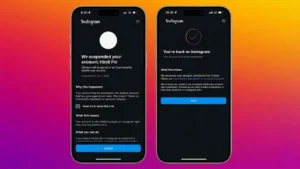
Many Instagram users recently reported sudden account suspensions without clear explanations. Some lost access to personal profiles, while others saw business pages and creator accounts disappear overnight.
In many cases, accounts can still be recovered — but only if users follow official recovery methods carefully and avoid common panic mistakes.
Also read: Apple’s AI Plans Face Pressure as Siri Integration and App Store Agents Raise Concerns
Why Instagram Suspends Accounts
Instagram uses automated moderation systems to detect suspicious activity and policy violations.
Common triggers include:
- Spam-like behavior
- Fake engagement tools
- Rapid following/unfollowing
- Repetitive comments
- Suspicious login attempts
- Unsafe third-party apps
- Community guideline violations
Sometimes real users are flagged accidentally by automated systems.
Step 1: Attempt a Normal Login
Start by trying to log in through the official Instagram app.
If your account is restricted, Instagram may display messages like:
- “Your account has been suspended”
- “Your account was disabled”
- “Appeal this decision”
Do not ignore these prompts.
Carefully follow the instructions shown inside the app.
Step 2: Submit an Appeal Through Instagram
Most suspended accounts receive an appeal option.
When submitting the appeal:
- Use real information
- Explain the situation clearly
- Stay professional and calm
- Avoid emotional messages or repeated submissions
Submitting multiple appeals aggressively usually does not speed up recovery.
Step 3: Complete Verification Requests Properly
Instagram may request:
- Selfie verification videos
- Government-issued ID
- Account ownership proof
Important:
- Upload clear photos
- Use genuine documents only
- Avoid edited images
- Match your account details accurately when possible
Incorrect submissions often create delays.
Step 4: Check Your Email Frequently
Instagram recovery updates are often sent by email.
Check:
- Inbox
- Spam folder
- Promotions tab
- Junk mail
Recovery links sometimes expire quickly, so delayed responses can create problems.
Step 5: Use Official Meta Recovery Support
Meta Help Center offers official recovery support tools for:
- Disabled accounts
- Hacked profiles
- Verification problems
Avoid:
- Fake “Instagram recovery experts”
- Telegram recovery services
- Paid hackers
- Unofficial agents claiming inside Meta access
Most are scams targeting desperate users.
Step 6: Stop Risky Login Behavior
After suspension, many users panic and:
- Keep retrying logins
- Use VPNs
- Switch devices repeatedly
- Spam support forms
This can increase security suspicion.
Instead:
- Use one trusted device
- Avoid public networks
- Stay patient during the review process
Step 7: Disconnect Unsafe Apps
Third-party apps are a major cause of restrictions.
Risky tools include:
- Auto-follow software
- Fake follower apps
- Engagement bots
- Unsafe analytics platforms
Remove all suspicious connected apps immediately.
Biggest Mistakes That Lead to Instagram Suspensions
Using Bots and Automation
Instagram strongly discourages artificial growth methods.
Bots that:
- Auto-like posts
- Follow users automatically
- Send bulk DMs
- Post repetitive comments
can quickly trigger restrictions.
Repetitive Commenting
Posting the same comment repeatedly across multiple posts appears spammy.
Even manual comments can trigger moderation systems if repeated excessively.
Mass Following and Liking
Aggressive growth tactics no longer work reliably.
Rapid activity patterns often appear robotic to Instagram’s systems.
Organic interaction is much safer.
Sending Promotional Spam
Repeated promotional DMs can lead to:
- Temporary restrictions
- Messaging blocks
- Account reviews
Users should avoid aggressive unsolicited marketing.
Content That Can Trigger Account Restrictions
Instagram also strictly moderates content involving:
- Violence
- Hate speech
- Harassment
- Adult content
- Copyright violations
- Fraud or fake investment schemes
Repeated violations increase permanent suspension risk.
How to Secure Your Account After Recovery
Once access is restored:
Enable Two-Factor Authentication
This protects accounts from hacking attempts and suspicious logins.
Use:
- Authenticator apps
- SMS verification
- Backup codes
Change Your Password Immediately
Use a unique password that:
- Is difficult to guess
- Is not reused elsewhere
- Includes strong combinations of characters
Avoid Unsafe Growth Shortcuts
Many users lose accounts because they chase fast growth instead of safe growth.
Focus on:
- Quality content
- Genuine engagement
- Consistent posting
- Real audience building
Shortcuts usually create long-term risk.
Safe Instagram Growth Practices
Safer strategies include:
- Using approved Meta tools only
- Building organic engagement
- Posting original content
- Interacting naturally with followers
- Avoiding fake engagement completely
Authentic activity performs better long-term.
Important Reality Check
Not every account gets restored.
If Instagram determines that severe or repeated policy violations occurred, recovery may fail permanently.
Also:
Anyone promising “guaranteed recovery” for money should not be trusted.
There is no secret shortcut that bypasses Meta’s systems reliably.
Also read: Spotify Embraces Apple’s Video Podcast Technology to Help Creators Reach More Platforms
Final Thoughts
Recovering a suspended Instagram account is possible in many situations, but users need patience and realistic expectations. The safest recovery method is always through Instagram and Meta’s official support systems.
But here’s the truth:
Most suspensions happen because users take unnecessary risks with automation tools, fake engagement, spam activity, or unsafe shortcuts. Temporary growth tricks may look attractive, but they often damage accounts permanently over time.
Long-term success on Instagram depends more on trust and consistency than aggressive hacks or shortcuts.