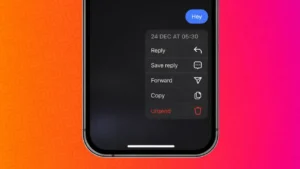
Instagram messages are fast and casual, but sometimes we send something by mistake. It could be a typo, the wrong emoji, or a message sent to the wrong person. Thankfully, Instagram gives users a simple way to remove messages after sending them.
In this guide, you will learn how to delete or unsend Instagram messages, what happens after removal, and important things you should know before using this feature.
Also read: Understanding WhatsApp Call Status Messages and What They Actually Mean
What Happens When You Delete A Message On Instagram
When you delete a message on Instagram using the unsend option, the message is removed from both sides of the conversation. The other person will no longer see it in the chat thread.
Instagram does not send a notification saying a message was unsent. However, if the receiver has already seen the message, removing it will not erase what they already read.
How To Unsend Messages On Instagram Mobile App
Instagram allows message removal directly from the chat screen. Follow these steps carefully:
- Open the Instagram app on your phone
- Tap the Messages icon in the top right corner
- Open the chat that contains the message
- Press and hold the message you want to remove
- Select Unsend from the menu
The message will disappear instantly from the conversation.
Also read: How to Schedule Posts on Instagram – Simple and Complete Guide
Can You Delete Multiple Messages At Once
Instagram currently does not support bulk message removal. Each message must be unsent one by one. If you want to clear an entire conversation, deleting the chat from your inbox is the only option, but this removes it only from your view, not from the other person’s inbox.
Difference Between Unsend And Delete Chat
Understanding this difference is important:
- Unsend removes a specific message for both users
- Delete chat removes the conversation only from your account
If privacy is your concern, unsending messages is the better choice.
Also read: How to Back Up Your Instagram Chats – Simple and Complete Guide
Does Unsend Work On Old Messages
Yes, Instagram allows you to unsend messages regardless of when they were sent. There is no time limit. Even messages sent months ago can be removed, as long as the chat still exists.
Things To Keep In Mind Before Unsending Messages
- The receiver may have already read the message
- Screenshots or screen recordings cannot be undone
- Media messages like photos or videos are also removed when unsent
- The feature works the same on Android and iPhone
Using unsend quickly gives better results.
Also read: How to Reset Your Instagram Feed – A Simple Fresh Start Guide
Can You Unsend Messages On Instagram Web
As of now, Instagram Web has limited messaging features. In most cases, unsend works best on the mobile app. If you do not see the option on desktop, use the mobile app instead.
Final Thoughts
Instagram’s message removal feature is helpful for fixing mistakes and protecting privacy. Whether it is a text, emoji, or media file, unsending gives you control over your conversations. Just remember that once a message is seen, removing it cannot change what someone already noticed.
Use this feature wisely and keep your chats clean and stress free.
Also read: How to Upload Longer Videos on Instagram – Complete Simple Guide