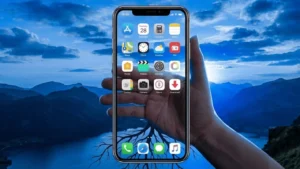
Transparent wallpaper (often called see through wallpaper or live camera background) is a fun way to customize your smartphone. When enabled, your home screen or lock screen appears as if it is transparent because the phone uses the camera feed behind your icons.
This guide explains what transparent wallpapers are, how they work, permissions they require, and how you can safely set them on both Android and iOS devices.
Also read: How to Set Up and Use Secure Folder or App Lock Features Without Third Party Apps
What Is a Transparent Wallpaper
A transparent wallpaper is a live wallpaper that uses your phone’s camera to display whatever is in front of your device. Instead of a normal static image, the screen shows a real time camera view behind your icons.
How It Works
- The wallpaper app accesses your camera
- The camera feed becomes your background
- Icons and widgets stay on top
- It creates a transparent or see through effect while navigating your phone
Is Transparent Wallpaper Safe
Yes, transparent wallpaper apps are safe as long as you download trusted apps from official stores like Google Play or the App Store. These apps only use your camera to generate the background effect.
Important Safety Notes
- Transparent wallpapers require camera permission, because the app needs to access the live feed.
- Some apps may request storage access to save wallpapers or settings.
- A good app will not ask for unnecessary permissions like contacts, messages, or microphone.
- Always review the app’s privacy policy and ratings before installing.
Features of Transparent Wallpaper Apps
Most transparent wallpaper apps offer:
- Live camera background
- Adjustable transparency levels
- Home screen and lock screen support
- Battery optimization settings
- Simple one tap setup
- No impact on your stored photos or files
How to Set Transparent Wallpaper on Android
Android allows full customization, including live wallpapers. Here’s how you can set a transparent wallpaper safely.
1. Download a Trusted Transparent Wallpaper App
Go to Google Play Store and install a verified transparent wallpaper app.
(Recommended safe option is mentioned below.)
2. Open the App and Allow Camera Permission
When you start the app, it will ask for:
- Camera permission → Necessary for live background
- Storage permission (optional) → For saving settings
These are normal permissions for wallpaper apps.
3. Preview the Transparent Wallpaper
The app shows a live preview of how your home screen will look with the camera feed.
4. Set as Wallpaper
Choose:
- Home Screen
- Lock Screen
or - Both
Android automatically applies the live wallpaper.
How to Set Transparent Wallpaper on iOS (iPhone)
iPhones do not support fully transparent live wallpapers in the same way Android does, but you can still create a similar effect using creative methods.
Method 1: Use Apps With Dynamic Background Effects
Some iOS apps simulate transparency using motion or AR style wallpapers. They do not access the camera in the background because iOS restricts it, but they provide a similar illusion.
Method 2: Use Live Photos
iOS allows live wallpapers on the lock screen.
You can set a dynamic background by:
- Downloading a live wallpaper from an app
- Applying it through settings
- Pressing the lock screen to activate the motion
Method 3: Use Widgets for Visual Depth
Transparent widget apps allow you to match widgets with your wallpaper to create a glass like illusion.
These options follow Apple’s strict privacy and battery rules.
Required Permissions for Transparent Wallpaper Apps
On Android
- Camera – Required for live transparency effect
- Storage – For saving wallpaper or settings (optional)
On iOS
- Photos – For saving or using wallpapers
- Camera – Only for AR or live preview features (not allowed for actual wallpapers in background)
Always allow only the permissions necessary for the app to function.
A Safe Transparent Wallpaper App You Can Try
Transparent Screen & Live Wallpaper (Android)
Google Play Store Link:
This app provides a transparent wallpaper effect using your phone’s camera. It allows you to preview the transparency, adjust settings, and apply the wallpaper easily. It follows standard Play Store policies and asks for only required permissions such as camera access for displaying the real time background.
You can try it if you want a simple and clean transparent wallpaper experience on Android.
Also read: How to Use Charging Animation App on Android (Complete Step-by-Step Guide)
Final Thoughts
Transparent wallpapers offer a unique way to personalize your Android or iPhone. Android supports live transparent backgrounds directly through apps, while iOS users can use live photos, dynamic wallpapers, or creative widget setups for a similar effect.
Make sure to use only trusted apps, allow only essential permissions, and always download from official app stores. With the right steps, you can safely enjoy a cool transparent home screen look on your smartphone.