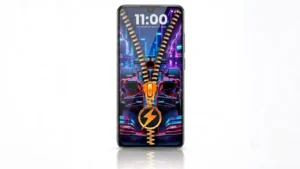
Customizing an Android phone goes far beyond changing wallpapers or icon packs. Today, many users also want a lock screen that reflects their personality while remaining practical and easy to use. If you’re looking for a fresh way to personalize your device, Zipper Lock Screen & Wallpaper offers a unique lock screen experience with interactive zipper effects, customizable themes, and dynamic wallpaper options.
Whether you enjoy creative phone customization or simply want something different from the standard Android lock screen, this app provides several tools to help transform your device’s appearance.
Also read: Mico: Create 4K Live Wallpapers and Smart Lock Screen Widgets on Android
What Is Zipper Lock Screen & Wallpaper?
Zipper Lock Screen & Wallpaper is an Android customization app that replaces your default lock screen with an interactive zipper-style unlocking experience. Instead of using a traditional swipe animation, the app lets you unlock your phone by dragging a virtual zipper across the screen.
Along with the zipper animation, the app includes customizable themes, wallpapers, and personalization options that allow users to create a lock screen matching their preferred style.
Interactive Zipper Unlock Experience
The app’s standout feature is its zipper-style unlocking animation. Every time you unlock your phone, you interact with a realistic zipper effect that gives your device a distinctive appearance.
Users can personalize several elements, including:
- Different zipper styles
- Custom zipper handles
- Theme colors
- Lock screen backgrounds
- Overall lock screen design
This simple feature adds a fun visual touch without changing how the phone functions.
Customize Your Lock Screen With Stylish Themes
One of the biggest highlights of the app is its wide range of customization options.
Users can explore various themes, including:
- Minimal designs
- Colorful backgrounds
- Neon-inspired themes
- Dark mode styles
- Nature wallpapers
- Futuristic visual effects
The flexibility makes it easy to switch between different looks whenever you want.
Dynamic 4D Live Wallpapers
The app also supports animated and interactive wallpapers that help make the lock screen feel more dynamic.
Depending on the available themes, users may find wallpapers featuring:
- Motion effects
- Touch-responsive animations
- Nature-inspired visuals
- Abstract artwork
- Modern digital backgrounds
These wallpapers can give the phone a more premium and visually engaging appearance.
Personalize Every Detail
Customization goes beyond wallpapers. The app allows users to modify several lock screen elements to create a unique setup.
Available personalization options may include:
- Zipper color and style
- Background image selection
- Theme customization
- Layout preferences
- Lock screen appearance
This level of flexibility allows users to create a design that matches their own preferences rather than relying on the default Android interface.
Security Features
Although the app focuses on customization, it also supports security options on compatible devices.
Depending on the version and device, users may be able to use:
- PIN protection
- Pattern lock
- Secure lock screen authentication
It’s always recommended to review the app’s settings and configure the available security options according to your needs.
Helpful Lock Screen Features
Besides visual customization, the app may also provide useful lock screen tools such as:
- Notification previews
- Clock and date display
- Battery information
- Quick-access shortcuts
- Easy access to selected apps
These additions help improve convenience without requiring users to unlock their devices repeatedly.
Smooth Performance
Customization apps often raise concerns about battery usage or performance. Zipper Lock Screen & Wallpaper is designed to provide a responsive experience while keeping resource usage manageable on most Android devices.
Performance benefits may include:
- Lightweight operation
- Smooth animations
- Responsive interface
- Easy setup process
Actual performance can vary depending on the smartphone model and the selected theme.
Who Should Try This App?
Zipper Lock Screen & Wallpaper is suitable for users who enjoy personalizing their Android devices, including:
- Android customization enthusiasts
- Students
- Gamers
- Theme lovers
- Content creators
- Users looking for a fresh lock screen experience
If you enjoy changing your phone’s appearance regularly, this app offers plenty of customization possibilities.
Tips for the Best Experience
To get the most out of the app:
- Choose lightweight themes if you use an older smartphone.
- Keep the app updated to access the latest features and improvements.
- Review requested permissions before enabling optional features.
- Experiment with different wallpaper and zipper combinations to create a personalized look.
Download Zipper Lock Screen & Wallpaper
If you’d like to try the app, you can download Zipper Lock Screen & Wallpaper from the Google Play Store.
Google Play Store (Optional):
https://play.google.com/store/apps/details?id=zipper.lockscreens.customize.wallpaper
As with any Android app, it’s a good idea to review the app description, permissions, ratings, and recent user reviews before installing.
Final Thoughts
Zipper Lock Screen & Wallpaper offers a creative alternative to the standard Android lock screen by combining interactive zipper effects with customizable themes and dynamic wallpapers. Its simple interface and flexible personalization options make it an appealing choice for users who enjoy giving their smartphones a unique look.
While customization preferences vary from person to person, this app provides an easy way to refresh your device’s appearance without requiring advanced setup. If you’re looking for a different lock screen experience that blends style with personalization, Zipper Lock Screen & Wallpaper is worth exploring.