YouTube is entertaining and informative, but it is easy to lose track of time while watching videos. If you want better control over your daily screen habits, YouTube provides official tools to check how much time you spend on the platform. This guide explains simple and reliable ways to view your YouTube watch time on mobile and desktop.
Also read: How to Change Your Netflix Profile Picture Step by Step
How to Check YouTube Watch Time Using the YouTube App
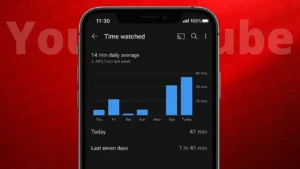
The YouTube mobile app includes a built-in time tracking feature that shows your daily and weekly usage.
Steps on Android and iPhone
- Open the YouTube app
- Tap your profile picture in the top right corner
- Select Time watched
You will see:
- Total watch time for today
- Average daily watch time
- Watch history for the past week
This is the most accurate way to check your usage because it is directly tracked by YouTube.
How to See YouTube Watch Time Using Google Digital Wellbeing
On many Android phones, YouTube usage is also tracked by the phone’s system settings.
Steps on Android
- Open Settings
- Tap Digital Wellbeing and parental controls
- Select Dashboard
- Find YouTube in the app list
This shows:
- Total time spent on YouTube
- Number of app opens
- Notification count
This method is helpful if you want to see YouTube usage along with other apps.
Also read: How to Find Videos You Have Liked on YouTube Using Any Device
How to Check YouTube Activity Through Google Account
YouTube activity is linked to your Google account, and you can review it from a browser.
Steps
- Open your browser and sign in to your Google account
- Go to Data and privacy
- Open History settings
- Select YouTube history
Here you can:
- View videos you watched
- Check activity by date
- Understand usage patterns
This method does not show total hours clearly, but it helps you analyze your viewing habits.
How to Reduce Time Spent on YouTube
Once you know how much time you spend on YouTube, you can manage it better.
Helpful options include:
- Setting a daily reminder in Time watched settings
- Turning on Take a break notifications
- Limiting background play
- Using phone screen time limits
These features are optional and easy to change anytime.
Also read: How to Upload Longer Videos on Instagram – Complete Simple Guide
Final Thoughts
Tracking how much time you spend on YouTube helps you stay mindful of your screen habits. Whether you use the YouTube app, phone settings, or your Google account, all methods are official and safe. Once you understand your usage, you can decide how to balance entertainment with productivity in a healthier way.