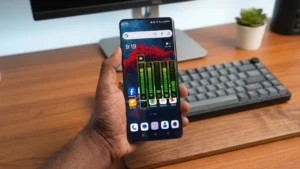
Android offers plenty of ways to personalize your smartphone, from custom launchers and icon packs to live wallpapers and widgets. However, one area that often goes unnoticed is the volume panel. Most Android devices still use a simple and outdated volume slider that lacks style and personality.
If you’re someone who enjoys customizing every part of your phone, Neon LED Volume – Volume Style is an app worth checking out. It transforms your standard volume controls into a vibrant, animated interface with colorful RGB lighting effects, stylish themes, and smooth animations that make every volume adjustment look premium.
In this article, we’ll explore everything you need to know about the app, including its features, performance, customization options, and why it stands out from other Android personalization apps.
Also read: Licowa AI Photo Editor – A Simple All-in-One App for Editing, Collages, and Live Wallpapers
What is Neon LED Volume – Volume Style?
Neon LED Volume – Volume Style is an Android customization app that replaces your phone’s default volume panel with beautifully designed RGB-inspired sliders and modern animations. Instead of the ordinary volume controls found on most smartphones, the app lets you enjoy colorful neon effects that give your device a unique and futuristic appearance.
The app is designed for users who love personalizing their smartphones without making the interface complicated or difficult to use.
Why Should You Customize Your Volume Panel?
Most Android users customize wallpapers, themes, and lock screens but rarely think about the volume panel. Since it’s something you use every day, giving it a fresh look can make your phone feel completely different.
Using a custom volume panel allows you to:
- Give your phone a premium appearance
- Make your Android interface more stylish
- Add colorful RGB lighting effects
- Match the volume panel with your overall theme
- Create a unique setup that stands out from other devices
It’s a small change that can have a surprisingly big impact on your overall user experience.
Key Features of Neon LED Volume – Volume Style
Vibrant Neon LED Volume Styles
The biggest highlight of the app is its collection of Neon LED-inspired volume panels. Every time you adjust your phone’s volume, you’ll see attractive glowing animations instead of the standard Android slider.
These effects give your smartphone a modern gaming-inspired appearance that’s both eye-catching and enjoyable to use.
RGB Color Effects
The app lets you customize your volume panel with a wide range of RGB colors.
Whether you prefer vibrant blue, neon green, purple, red, or colorful gradient combinations, you can personalize the interface to match your style.
This feature is especially popular among users who enjoy RGB-themed Android setups.
Fully Customizable Design
One of the strongest features of the app is its flexibility.
Users can customize almost every aspect of the volume panel, including:
- Color
- Size
- Position
- Shape
- Overall style
This level of personalization allows you to create a volume panel that perfectly matches your phone’s theme.
Smooth Animations
The app doesn’t simply change the appearance—it also improves the overall experience.
Whenever you increase or decrease the volume, smooth transition animations make every interaction feel fluid and premium.
The animations are designed to enhance the interface without affecting everyday usability.
Simple User Interface
Despite offering numerous customization options, the app remains easy to navigate.
Even users who have never customized their Android device before can quickly apply a new volume style with just a few taps.
How to Use Neon LED Volume – Volume Style
Getting started is quick and straightforward.
Step 1
Download and install Neon LED Volume – Volume Style from the Google Play Store.
Step 2
Open the application and grant the necessary permissions.
These permissions allow the app to replace your default volume controls.
Step 3
Browse through the available themes and RGB styles.
Step 4
Customize the appearance by adjusting colors, size, position, and animation settings.
Step 5
Tap Apply or Save to activate your new volume panel.
Once completed, every volume adjustment will display your newly customized interface.
Performance and Battery Usage
Many users worry that customization apps may slow down their devices or consume excessive battery power.
Fortunately, Neon LED Volume – Volume Style is designed to remain lightweight and optimized for daily use.
The app offers:
- Fast performance
- Smooth animations
- Low RAM usage
- Minimal battery consumption
Even on mid-range Android devices, the app generally runs smoothly without noticeable lag.
Tips for the Best Experience
To get the most attractive results, consider these simple tips:
- Use dark wallpapers to make neon effects stand out.
- Match RGB colors with your icon pack or launcher theme.
- Choose a minimal color scheme if you prefer a clean interface.
- Avoid using overly bright effects if you want to save battery.
These small adjustments can make your phone look even more polished.
Safety Tips
Whenever installing any customization app, it’s always good practice to follow basic safety guidelines.
- Download apps only from the official Google Play Store.
- Review the permissions requested by the app before granting access.
- Keep the application updated to receive new features and security improvements.
Following these steps helps ensure a safer and smoother experience.
Who Should Use This App?
Neon LED Volume – Volume Style is ideal for:
- Android customization enthusiasts
- Gamers who enjoy RGB-inspired interfaces
- Content creators and YouTubers
- Users who love modern smartphone themes
- Anyone looking to refresh their Android experience
Whether you’re building a gaming setup or simply want your phone to look different, this app offers an easy way to personalize your device.
Download Neon LED Volume – Volume Style
If you’d like to give your Android phone a fresh new look, you can download the app directly from the Google Play Store.
App Name: Neon LED Volume – Volume Style
Download Link:
https://play.google.com/store/apps/details?id=com.rgbstyle.volumepanel
Final Thoughts
If you’re looking for a simple yet effective way to make your Android phone feel more modern, Neon LED Volume – Volume Style is definitely worth trying. Instead of settling for the default Android volume controls, the app lets you enjoy colorful RGB lighting, smooth animations, and complete customization with just a few taps.
Its lightweight performance, beginner-friendly interface, and attractive visual effects make it a great choice for users who love personalizing their smartphones. Whether you’re creating a gaming-inspired setup or simply want a more stylish user interface, this app adds a unique touch that makes everyday interactions feel more enjoyable.