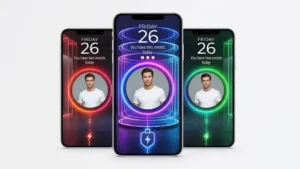
Your phone doesn’t have to look ordinary just because it’s plugged into a charger. While most Android phones display a basic battery indicator during charging, customization apps let you give this screen a more personal touch.
Batix – Charging Photo is an Android personalization app designed for users who want to make their charging screen more interesting. It offers photo-based customization, animated effects, and different visual themes that can change the way your phone looks while charging.
If you enjoy experimenting with your phone’s appearance, here’s what the app offers and how you can get started.
Also read: Alpha Hybrid Launcher 4D: A Simple Way to Refresh Your Android Home Screen
What Is Batix – Charging Photo?
Batix – Charging Photo is an app that lets you customize the screen experience when your Android phone is connected to a charger.
Instead of sticking with the usual charging indicator, you can explore different visual designs and, where supported, display your own photos alongside charging animations.
The idea is simple: make a routine activity like charging your phone feel a little more personalized. The exact options and behavior may vary depending on your device and the app version.
Key Features of Batix – Charging Photo
1. Use Your Own Photos
One of the main attractions is the option to personalize the charging screen with images from your gallery.
You could choose a favorite picture, a family photo, a travel memory, a picture of your pet, or an image that matches your phone’s overall theme.
This gives you more freedom than using a fixed charging design. You can choose something meaningful to you instead of seeing the same default battery indicator every time.
2. Different Charging Themes
If personal photos aren’t your thing, you can explore the available charging themes.
The supplied app information describes several visual styles, including neon-inspired designs, futuristic graphics, colorful effects, and abstract artwork.
These options can be useful if you prefer a modern or vibrant look for your phone. Available themes may differ by app version, and some options could require an in-app purchase.
3. Animated Charging Effects
Static images aren’t the only way to change the charging screen. Batix also offers animated charging effects designed to appear when charging begins.
These effects add movement to the screen and can make the charging experience feel more dynamic.
If you like experimenting with different visual styles, you can try the available animations and choose the one that suits your taste.
4. Battery Information While Charging
Along with visual customization, the app may display battery-related information while your phone charges.
Depending on the available features, this can include details such as the current battery percentage, charging status, or charging progress.
The information shown can vary by device and app version, so check the available settings to see exactly what your phone supports.
5. Neon and Colorful Visual Effects
For users who enjoy bright colors and glowing designs, neon-style effects can add another layer of customization.
Batix includes colorful visual styles intended to give the charging screen a more eye-catching appearance. These designs may look particularly appealing on phones with vibrant displays.
You can experiment with the available effects until you find a design that fits your preferences.
6. Simple Customization Options
You don’t need advanced technical knowledge to experiment with a charging screen app.
The general setup process involves choosing a design, selecting a photo if you want one, and enabling the available charging-screen features.
Once you’ve configured the options, you can test the result by connecting your phone to a charger.
How to Set Up Batix – Charging Photo
Getting started should be straightforward if the app is compatible with your device.
- Open the Google Play Store.
- Search for Batix – Charging Photo or open the app’s link below.
- Review the listing and confirm that it is the correct app.
- Tap Install if it is available for your device.
- Open the app after installation.
- Choose a charging theme or select a personal photo, if supported.
- Explore the available animations and battery display settings.
- Enable the charging-screen feature and connect your phone to a charger to test it.
The names and positions of settings may differ from one version to another. If the charging screen doesn’t appear as expected, check the app’s instructions and your phone’s battery or background-app settings.
What Are the Benefits of Using Batix?
Make Your Phone Feel More Personal
Using your own photos or a theme you like can make the charging screen feel more connected to your personal style.
Add Something Different to Charging
A custom animation can make the screen more visually interesting than the standard charging indicator.
Experiment With Different Designs
With different themes and visual effects, you can change the look whenever you want rather than sticking with one design.
Keep an Eye on Battery Progress
If your chosen setup supports battery information, you may be able to check the displayed percentage or charging status without opening another screen.
Things to Check Before Installing
Before installing Batix, take a moment to review its current Google Play listing, developer information, recent user reviews, and requested permissions.
Also, keep in mind that charging-screen effects may behave differently across Android devices. Some phones restrict background activity or display their own charging interface, which can affect how third-party customization apps work.
Animated effects may also consume additional resources. If you notice unusual battery drain, unwanted interruptions, or performance issues, try reducing the effects or disabling the feature.
Who Should Try Batix – Charging Photo?
The app may appeal to several types of Android users:
- Customization enthusiasts: People who enjoy changing their phone’s appearance.
- Photo lovers: Users who want to display favorite pictures as part of their charging experience.
- Fans of colorful designs: People who prefer animated, neon-inspired, or vibrant themes.
- Users who enjoy personalization apps: Anyone looking for another way to make their smartphone feel less ordinary.
If you prefer a clean, minimal interface, the default charging screen may already be enough for you.
Try Batix – Charging Photo
If you want to explore its charging-screen designs and photo customization options, you can check the app using the link below.
Get Batix – Charging Photo on Google Play
Availability and features may vary depending on your device and the current app version.
Also read: Gesture – Draw Simple Gestures to Perform Actions Quickly
Final Thoughts
Batix – Charging Photo offers Android users another way to personalize their smartphones, this time focusing on the screen that appears while the device is charging.
Its photo customization, animated effects, and themed designs may appeal to anyone who enjoys making small changes to their phone’s appearance.
Before installing it, check the current app listing and permissions, and make sure it works well with your device. If you enjoy smartphone customization, trying a different charging-screen design can be a simple way to give your phone a fresh look.