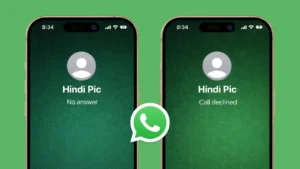
When you make a call on WhatsApp, the app often shows short status messages like Unavailable, No Answer, or Call Declined. These messages can feel confusing because WhatsApp does not always explain the exact reason behind them. However, each status gives a useful hint about what is happening on the other side.
In this guide, we break down the most common WhatsApp call statuses and explain what they usually indicate in real-life situations.
Also read: How To Silence WhatsApp Calls From Someone Without Blocking Them
What Does “Unavailable” Mean on a WhatsApp Call?
If your WhatsApp call shows Unavailable, it generally means the call could not connect at all.
Common reasons include:
- The other person does not have an active internet connection
- Their phone is switched off or in airplane mode
- WhatsApp is not allowed to use mobile data or Wi-Fi on their device
- Temporary WhatsApp server or network issues
This status usually appears when the call fails before it even starts ringing.
What Does “No Answer” Mean on WhatsApp?
The No Answer status means the call rang on the other person’s device, but they did not pick it up.
Possible reasons:
- They were busy or away from their phone
- Their phone was on silent or Do Not Disturb
- They saw the call but chose not to answer
- The call timed out after ringing for some time
This does not automatically mean the call was intentionally ignored. It simply indicates that the call was not answered in time.
What Does “Call Declined” Mean?
When WhatsApp shows Call Declined, it usually means the person actively rejected the call.
This can happen when:
- They tapped the decline button on the call screen
- They ended the call immediately after it started ringing
- They were already on another WhatsApp or phone call
In most cases, this status appears only when the call is manually declined.
Why Do These Statuses Change Sometimes?
WhatsApp call statuses are affected by several factors, such as:
- Internet quality on both devices
- Phone settings like battery saver or background restrictions
- App permissions
- Device performance or temporary glitches
Because of this, the same situation may sometimes show different statuses.
Can These Statuses Indicate That You Are Restricted?
These messages alone do not confirm that you are restricted or blocked.
For example:
- Unavailable can be caused by poor connectivity
- No Answer may simply mean the person was busy
- Call Declined can happen for many everyday reasons
To understand the full picture, it is better to observe patterns over time rather than relying on a single call status.
Tips to Avoid WhatsApp Call Issues
If you frequently see call problems, try these steps:
- Make sure your internet connection is stable
- Update WhatsApp to the latest version
- Allow WhatsApp to run in the background
- Disable battery optimization for WhatsApp
- Restart your phone if calls fail repeatedly
These steps can improve call reliability and reduce confusing call statuses.
Also read: Create WhatsApp Stickers Without Installing Any App on Android and iPhone
Final Thoughts
WhatsApp call status messages are short but meaningful. Each one reflects a different stage of how the call was handled, whether it failed to connect, went unanswered, or was declined. Understanding these messages helps avoid confusion and unnecessary assumptions.
If call issues happen regularly, checking network settings and app permissions often resolves the problem quickly.