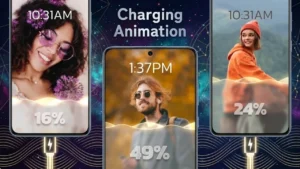
Most Android smartphones display a basic charging screen that shows battery percentage and charging status. Users who enjoy personalizing their devices often look for apps that offer additional visual customization options. One such app is Battery Charging Animation 4K, which provides charging-screen animations, visual themes, and battery-related information.
This article provides an overview of the app’s features and functionality based on information available at the time of writing.
Also read: Best Lighter Simulator Apps for Android to Create Realistic Concert-Style Flame Effects
What Is Battery Charging Animation 4K?
Battery Charging Animation 4K is an Android application that allows users to display animated visual effects when a device is connected to a charger. The app is intended to replace or supplement the default charging screen with customizable animation themes and charging visuals.
Depending on the version of the app and device compatibility, users may also be able to view battery-related information while charging.
Main Features
Charging Animations
The app includes various charging animation styles that can appear when a charger is connected to the device. Available animations may vary depending on the app version.
Theme Collection
Users can browse and apply different charging-screen themes, including:
- Neon-style effects
- RGB-inspired designs
- Energy-themed animations
- Futuristic visual layouts
- Gaming-inspired charging effects
Theme availability may change as the developer updates the application.
Battery Information Display
Some versions of the app may display battery-related information such as:
- Battery percentage
- Charging status
- Battery temperature
- Voltage information
Displayed information can vary based on device support and Android version.
Customization Options
Users may have access to settings that allow them to adjust:
- Animation styles
- Theme selection
- Visual appearance
- Display preferences
Available customization options may differ across devices and app updates.
User Interface
The application includes a graphical interface designed to help users browse themes, select animations, and configure available settings.
Why Users Explore Charging Animation Apps
Charging animation apps are commonly used by people who enjoy Android customization. These apps provide an alternative visual experience during charging and allow users to personalize their devices beyond wallpapers and icon packs.
Potential reasons users explore these apps include:
- Customizing the charging screen
- Trying different visual styles
- Adding animated effects to the device
- Viewing battery-related information during charging
Individual preferences and experiences may vary.
Types of Charging Effects Commonly Available
Charging animation applications often include various categories of visual effects, such as:
Neon Effects
Bright color-based animations inspired by neon lighting.
Energy Effects
Visual themes designed to represent energy transfer during charging.
Futuristic Themes
Modern interface designs influenced by science-fiction concepts.
RGB-Style Animations
Colorful lighting effects commonly associated with gaming setups.
Motion-Based Effects
Animated visuals that emphasize movement and transitions during charging.
The exact selection depends on the app version and developer updates.
Battery Monitoring Features
Some charging animation apps provide access to battery-related information. Depending on device compatibility, users may be able to view:
- Current battery level
- Charging status
- Battery temperature
- Charging progress
Availability of these details may vary between devices.
Installation and Setup
Users interested in trying the app can typically follow these steps:
- Download the application from the Google Play Store.
- Open the app after installation.
- Review and grant any permissions required for selected features.
- Choose a charging animation or theme.
- Save the settings and connect the device to a charger.
The setup process may differ depending on the Android version and app release.
Things to Consider
Before installing any third-party application, users may wish to:
- Review app permissions
- Read recent user reviews
- Check the developer information
- Review the privacy policy
- Verify compatibility with their Android device
These steps can help users make informed decisions before installation.
Who Might Be Interested in This App?
Battery Charging Animation 4K may appeal to:
- Android customization enthusiasts
- Users interested in visual personalization
- Mobile technology enthusiasts
- Content creators showcasing smartphone setups
- Users exploring charging-screen customization
Individual experiences may differ depending on device specifications and personal preferences.
Also read: Best Android Live Wallpaper Apps With 3D Effects, Clock, and Battery Widgets
Download Battery Charging Animation 4K
Users who want to learn more about the application can visit its Google Play Store listing.
Google Play Store (Optional):
https://play.google.com/store/apps/details?id=free.charginganimation.chargingshow.batterycharging.animationeffects.lockscreen.batteryinfo
Alternatively, search for Battery Charging Animation 4K directly in the Google Play Store.
Final Thoughts
Battery Charging Animation 4K is an Android customization application that focuses on charging-screen animations and visual themes. It offers users an alternative way to personalize the appearance of their device while charging.
Features, performance, permissions, and compatibility may vary depending on the Android version, device model, region, and app update. Users should review the latest information available on the Google Play Store before downloading or using any application.