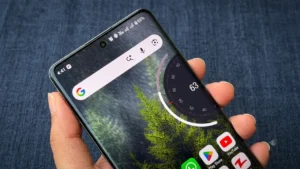
Smartphone customization goes far beyond wallpapers, icons, and themes. While most users focus on changing the appearance of their home screens, one interface element often gets overlooked—the volume control panel. If you’re looking to give your Android device a cleaner and more modern feel, NoVolume is an app worth checking out.
Designed with a minimalist aesthetic inspired by Nothing OS, NoVolume replaces the standard Android volume slider with a sleek and customizable interface. The app focuses on improving the look and feel of everyday interactions without making volume management complicated.
Also read: Best Android Live Wallpaper Apps With 3D Effects, Clock, and Battery Widgets
What Is NoVolume?
NoVolume is an Android customization app that replaces your phone’s default volume control panel with a redesigned alternative. Instead of the traditional volume slider provided by your device manufacturer, the app introduces a cleaner, more polished interface that feels modern and visually appealing.
The goal is simple: make one of the most frequently used smartphone controls look better while keeping it easy to use.
Why Android Users Are Trying NoVolume
Many Android users enjoy personalizing every aspect of their devices. NoVolume appeals to those who want a fresh interface without installing a complete launcher or theme pack.
Some reasons behind its growing popularity include:
- Minimal and elegant design
- Inspired by the Nothing OS visual style
- Smooth animations
- Customizable appearance
- Lightweight performance
- Easy setup process
Key Features of NoVolume
Modern Minimalist Design
The biggest attraction of NoVolume is its clean user interface. The volume controls appear more refined and less cluttered than many stock Android implementations.
Smooth Volume Animations
The app adds fluid animations when adjusting volume levels, creating a premium feel during everyday use.
Haptic Feedback Support
On supported devices, NoVolume can provide subtle vibration feedback while changing volume levels. This makes interactions feel more responsive and natural.
Customizable Layout
Users can personalize various elements of the volume panel, including:
- Position on screen
- Size and dimensions
- Visual appearance
- Style preferences
This flexibility allows users to match the volume controls with their preferred Android setup.
Lightweight Performance
Unlike some customization apps that consume significant resources, NoVolume is designed to remain lightweight and responsive during daily usage.
How to Set Up NoVolume
Getting started with NoVolume is relatively simple:
Step 1: Install the App
Download NoVolume from a trusted source and install it on your Android smartphone.
Step 2: Grant Required Permissions
To replace the default volume controls, the app may request accessibility permissions or other system-level access. Review the permissions carefully before enabling them.
Step 3: Activate the Custom Volume Panel
Follow the on-screen instructions to enable NoVolume as your preferred volume interface.
Step 4: Customize the Experience
Adjust the design, placement, and visual settings to create a volume control panel that matches your style.
Everyday Experience
Once configured, NoVolume becomes part of your daily smartphone experience. Every time you adjust media, ringtone, or notification volume, you’ll see the redesigned interface instead of the stock Android version.
Users often appreciate:
- Cleaner appearance
- Faster visual feedback
- Easy accessibility
- Modern design language
- Improved overall aesthetics
Performance and Battery Impact
One common concern with customization apps is battery usage. NoVolume is designed to keep resource consumption low while maintaining smooth performance.
Depending on your device, you may experience:
- Low memory usage
- Minimal background activity
- Smooth operation
- Negligible battery impact
Actual performance may vary depending on Android version and device specifications.
Privacy and Security Considerations
Before installing any customization app, users should always review permission requirements and privacy policies.
NoVolume primarily requests permissions necessary for modifying and displaying custom volume controls. As with any Android app, it is recommended to verify permissions before granting access.
Who Should Use NoVolume?
NoVolume may be a good fit for:
- Android customization enthusiasts
- Users who enjoy minimalist designs
- Fans of Nothing OS aesthetics
- People looking for subtle UI improvements
- Users who want a fresh Android experience without changing launchers
Pros
- Clean and modern interface
- Smooth animations
- Lightweight performance
- Customizable design
- Easy to use
Cons
- Compatibility may vary between devices
- Some features depend on Android version
- Additional permissions may be required
Also read: Transform Your Android Home Screen With GO Launcher S: Themes, Wallpapers and Smart Customization
Download NoVolume
If you’d like to try NoVolume on your Android device, you can download it from the Google Play Store.
Google Play Store (Optional):
https://play.google.com/store/apps/details?id=com.nostudio.novolume
Final Thoughts
NoVolume proves that even small interface changes can significantly improve the overall smartphone experience. Instead of completely redesigning your phone, the app focuses on enhancing a feature that users interact with countless times every day.
For Android users who appreciate clean design and personalization, NoVolume offers a simple yet effective way to modernize volume controls. If you’re looking for a fresh, Nothing OS-inspired touch without changing your entire setup, this app is definitely worth exploring.